ESP Feature · 10 min read · 2026-09-29
Gain Total Map Awareness with Our Arena Breakout ESP
Learn how skeleton, health, armor, loot, container, quest, and extraction ESP can create a clear raid view without unnecessary clutter.
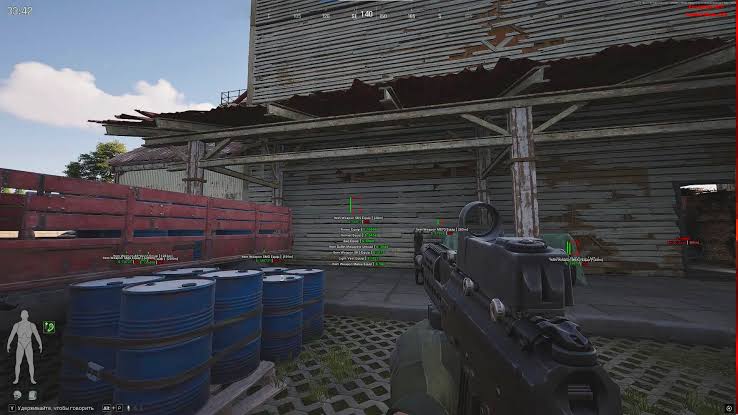
How Arena Breakout ESP improves map awareness
Arena Breakout ESP organizes player and world information into an on-screen overlay. It can show operators, skeletons, health, armor, loot, containers, quests, and extraction points during a raid.
The main benefit is faster context. Instead of showing every possible label, a strong setup separates each category so players can build a view around the current route.
Arena Breakout Infinite combines close indoor fights, open terrain, PvP, PvE, and extraction decisions. That variety makes distance filters and individual toggles as important as the information itself.
Player, skeleton, health, and armor ESP
Player ESP marks operator positions. A box gives a simple outline, while skeleton ESP shows stance and body position more precisely around doors, stairs, and cover.
Health ESP helps compare targets before a push. Armor information adds another layer by showing whether an operator may absorb more damage than their remaining health suggests.
Use a clear color difference for teammates and hostile players where that option exists. Friendly and hostile markers that look alike can slow decisions during a crowded fight.
Keep the display readable
Start with a box, health, and distance. Add skeleton and armor only after those elements remain readable at the resolution you use.
Shorten the player draw distance inside dense areas. Long-range labels through several rooms can overlap and hide nearby movement.
Loot and container ESP
Loot ESP is most useful with category, value, and distance filters. Showing every object can turn a useful route tool into a wall of labels.
Container ESP helps identify searchable locations before entering a room. Keep containers separate from loose items so each group can be hidden when the raid objective changes.
For a wider comparison of visual controls and buyer value, see the 2026 feature comparison.
Quest and extraction markers
Quest markers support objective-focused runs by keeping the relevant location visible. They should be optional because the same marker may not help during a loot or PvP route.
Extraction ESP can show available exit locations and distance. That makes timing easier to judge after a fight or when the inventory is full.
Do not let distant extracts cover the middle of the display. A small label, controlled range, or edge marker is easier to read while moving.
Build a clean ESP profile
Turn on one category at a time: players, health, armor, loot, containers, quests, then extracts. Test each addition in both indoor and outdoor areas before increasing its range.
Use fewer labels for combat and more route information for looting. Separate profiles can save time when switching between quest runs and aggressive squad play.
Pair the visual setup with the Arena Breakout aimbot guide only after the screen is easy to read. Aim controls cannot fix a target view hidden by overlapping text.
Compatibility, status, and purchase details
Arena Breakout Infinite uses ACE. A game or anti-cheat update can affect overlay compatibility, so check the current status after meaningful patches.
Confirm Windows support, available filters, draw-distance controls, and support access before choosing a build. For the live feature list and license options, review arena breakout cheats before checkout.
The best profile is not the busiest one. Keep the information that changes a raid decision and hide anything that repeatedly covers the action.
Ready for arena breakout cheats?
Check live ACE status, then buy ESP, aimbot, and recoil control for Arena Breakout Infinite on arenabreakoutcheats.net. Need help? Read support or player reviews. Own the game via the official site.
Community replies
Discussion prompts based on common player questions.
MapLineABI
ESP settings · Sep 29, 2026
Health, distance, and a basic box are enough for my combat profile. Skeleton lines help indoors, but I keep loot labels in a separate preset.
ContainerRoute
Sep 29, 2026
Can container range be shorter than extract range? I want nearby search points without losing the direction of a distant exit.
ValleyMarker
Quest runner · Sep 30, 2026
Separate quest toggles make a big difference. Once the objective is finished, hiding that marker keeps the return route much cleaner.
ClearOverlay
Sep 30, 2026
Team colors need to be very different from hostile colors. Similar shades become hard to read when several players cross the same doorway.
Frequently asked questions
What information can Arena Breakout ESP show?
Common categories include players, skeletons, health, armor, loot, containers, quests, and extraction points. Exact options depend on the current product build.
How do I reduce ESP clutter?
Lower draw distances, hide low-value loot, and enable only the labels needed for the current raid. Separate combat and looting profiles can make switching easier.
Is skeleton ESP better than a box?
Skeleton lines provide more detail about stance and body position, while a box is simpler and often easier to read. Many players start with a box and add skeletons only for close indoor routes.
Should health and armor be shown together?
They can provide useful context together if the values remain readable. If labels overlap at range, keep health visible and move armor to a shorter-distance profile.
Why must ESP status be checked after updates?
Game and ACE updates can change how overlays interact with the current build. Recheck compatibility after meaningful patches instead of relying on an older status.