PC Features · 10 min read · 2026-09-29
Top Arena Breakout Infinite Cheats for PC Players
Compare the most useful PC feature groups, from clean ESP and loot filters to aim, recoil, compatibility, pricing, and support.
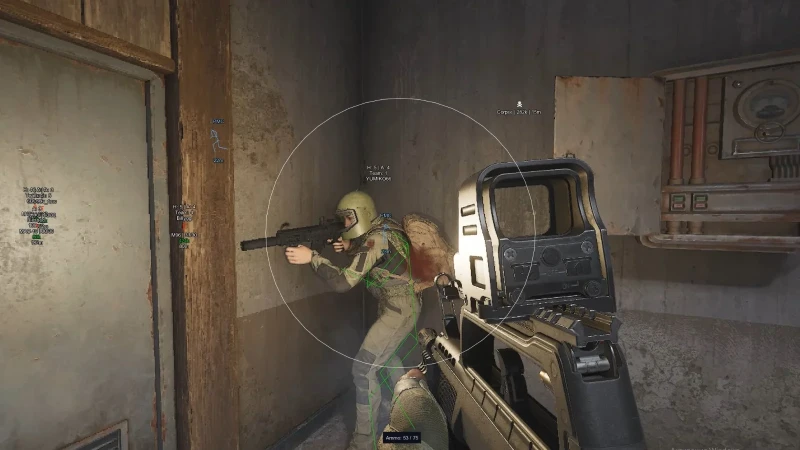
What PC players should expect from Arena Breakout Infinite tools
Arena Breakout Infinite cheats for PC usually group visual overlays, aim controls, and weapon settings into one menu. The best option is the one that clearly lists its controls, supported build, license term, and update status.
Arena Breakout Infinite is a free-to-play tactical extraction shooter on PC. Its official pages describe six maps, changing weather, PvP and PvE combat, and modes that include Tactical Ops, Solo Ops, and Covert Ops.
Those raid conditions create different needs at close, medium, and long range. A useful menu should let you narrow information instead of forcing one fixed layout.
1. ESP for faster visual decisions
ESP can show players, skeletons, health, armor, loot, containers, quests, and extraction points. Separate toggles are important because a single all-on display becomes crowded quickly.
Player distance helps judge whether a target matters now. Health and armor give more context before a push, while skeleton lines can show stance and body position around cover.
For a full order of operations, the ultimate Arena Breakout raid guide explains how to add awareness, aim, and recoil settings without changing everything at once.
2. Loot, container, and quest filters
Loot ESP is more useful when it supports category, value, or distance filters. A screen full of minor objects makes valuable items harder to notice.
Container and quest markers should be optional. Turn them on for a targeted route, then hide them during a PvP-focused run if they are no longer helping.
Extraction labels deserve their own control. A visible route marker can help with timing, but it should not cover the center of the screen during a fight.
3. Aimbot controls that can be tuned
Look for an activation bind, FOV, target bone, smoothness, visible check, max distance, and target-type filters. These controls determine when assistance starts and which target enters the selection pool.
A tight FOV limits selection to the area near the crosshair. Smoothness changes movement speed, while visible check can exclude a player who is fully blocked by cover.
Player, bot, teammate, and downed-target filters should not be hidden behind one switch. Clear filters make the final behavior easier to predict and test.
4. Recoil control for different weapons
Recoil control should be adjustable rather than fixed. Arena Breakout Infinite includes many weapon and attachment combinations, so one value will not feel the same across every loadout.
Tune recoil with aim assistance disabled first. Once weapon movement feels consistent, add aim settings and check whether the two systems still feel balanced together.
Save simple profiles by weapon class when the software supports it. A controlled rifle profile and a close-range profile are easier to manage than constant changes during a raid.
5. ACE status and PC compatibility
Arena Breakout Infinite uses ACE. Compatibility can change after game, launcher, Windows, driver, or anti-cheat updates, so status must be read as a point-in-time report.
Check the supported Windows version and game build before checkout. After a major patch, wait for a clear current status instead of relying on an old review or screenshot.
For current features, prices, and support access in one place, review arena breakout cheats before choosing a license.
6. Price, license length, and support
Compare the full cost with the stated license duration. A monthly option makes sense for short-term use, while a lifetime option depends more heavily on continued update communication and support.
The checkout should state platform, delivery method, and support route. Discord support is most useful when buyers can include an order ID, Windows version, game build, and exact error message.
Avoid judging value by feature count alone. A smaller menu with clear filters, current status, and direct setup help can be easier to use than a long list of unnamed switches.
A quick PC comparison checklist
Confirm Windows support, current game compatibility, visual categories, aim filters, recoil adjustment, license duration, delivery method, and the support channel.
Then decide which features match your normal raid. Players who focus on looting may value filters and extracts, while aggressive squads may care more about clean player information and controlled target selection.
Choose based on the settings you will actually use. Clear controls and current information provide more value than broad claims that cannot be tested.
Ready for arena breakout cheats?
Check live ACE status, then buy ESP, aimbot, and recoil control for Arena Breakout Infinite on arenabreakoutcheats.net. Need help? Read support or player reviews. Own the game via the official site.
Community replies
Discussion prompts based on common player questions.
PCLoadout
Hardware discussion · Sep 29, 2026
Separate filters are the feature I check first. Player, loot, and extract information all at the same distance is too much for smaller screens.
ArmorySteps
Sep 29, 2026
Does smoothness need to change with mouse sensitivity? I use a lower in-game sensitivity and the same menu value feels slower than examples I have seen.
KoenRunner
Loot-focused player · Sep 30, 2026
Value and category filters make a bigger difference than showing every item. I only want route loot and the nearest available extraction on screen.
IronSightABI
Sep 30, 2026
Checking the build after patches should be part of the comparison. A detailed feature list means very little while the current version is still being updated.
Frequently asked questions
What are the most useful PC feature groups?
The main groups are player and world ESP, loot and extraction filters, aim controls, and recoil adjustment. Which group matters most depends on whether your raid is focused on PvP, quests, or looting.
Which aim controls should be listed?
Look for activation mode, FOV, target bone, smoothness, visible check, maximum distance, and separate player or bot filters. These settings make target selection easier to understand and test.
Does one recoil value work for every weapon?
Usually not. Weapons, optics, attachments, and fire modes can feel different, so adjustable values or simple weapon-class profiles are more practical.
How do I check ACE compatibility?
Read the current product status and confirm the listed game and Windows versions. Check again after major game, launcher, Windows, driver, or ACE updates.
What should I compare before buying?
Compare exact controls, supported platform, current status, license duration, delivery method, price, and support access. Use the details you can verify rather than broad performance claims.